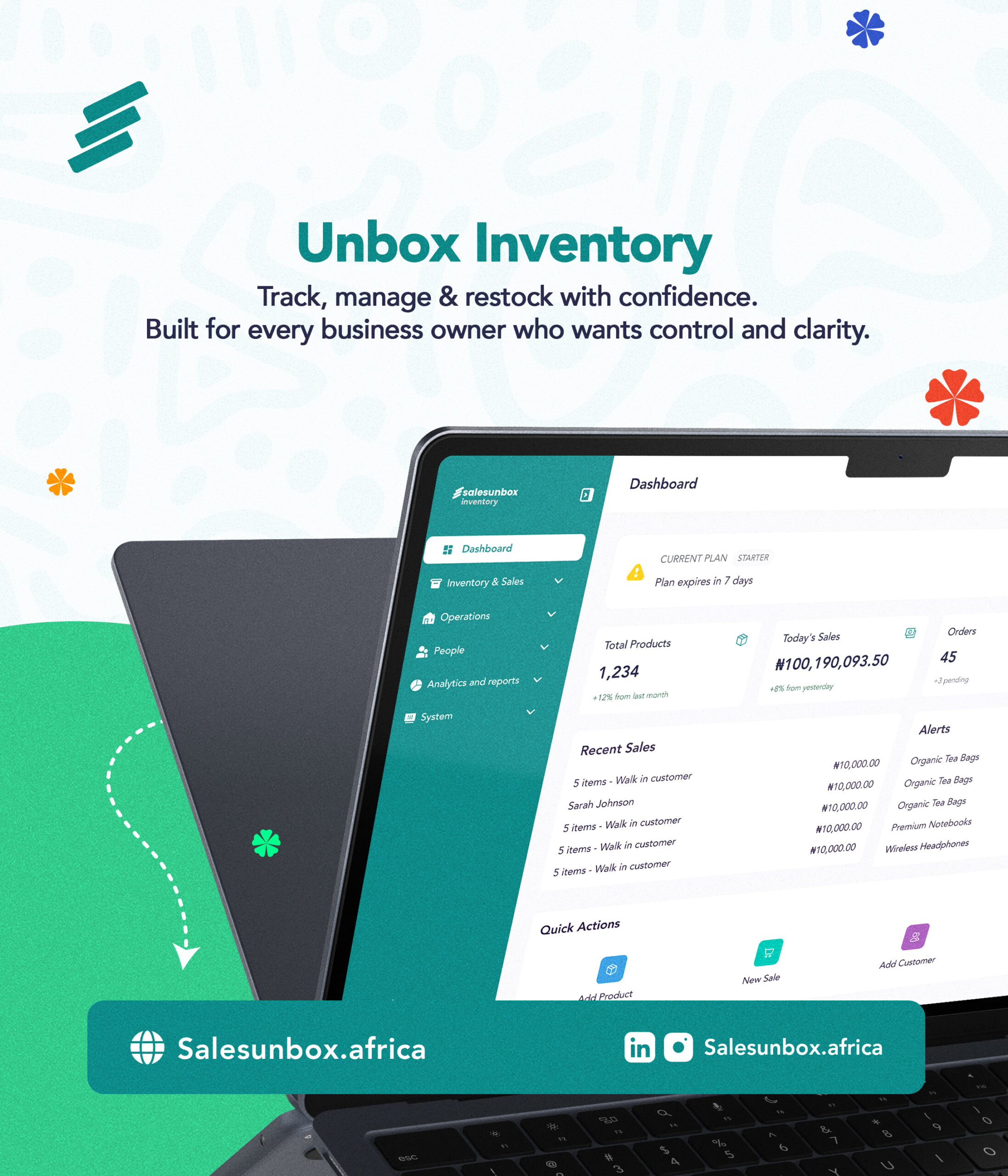
Exploring Unbox Inventory: A complete look at how it works reveals precisely why retailers are switching from disorganized manual tracking to centralized digital infrastructure.
What if you could walk into your store or log in from anywhere in the world and instantly know exactly how much stock you have, how much you’ve sold today, which products are running low, and which staff member processed every transaction?
No guesswork. No manual counting. No end-of-month panic. That is exactly what Unbox Inventory is built to do.
Designed specifically for enterprise environments with high-volume, fast-moving inventory such as pharmacies, supermarkets, mini markets, FMCG distributors, and multi-location storefronts, this platform gives operators the clarity that turns a stressful daily routine into a structured, scalable business. Here is a full walkthrough of how it works.
The Command Center: Your Real-Time Dashboard
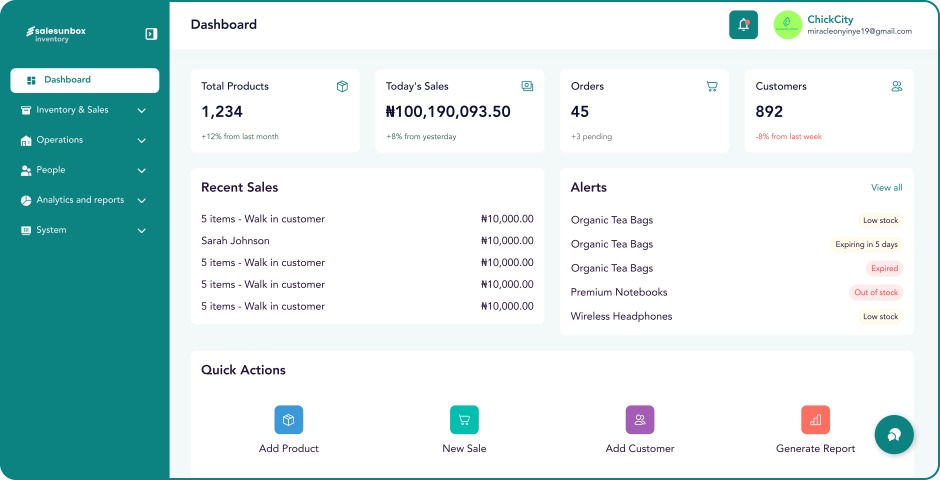
The moment you log in, you land on a unified dashboard. Unlike most software dashboards that dump raw numbers at you without any corporate context, this dashboard is built to give you a genuine snapshot of your operational performance at a glance.
From one centralized screen, you can monitor:
- Total inventory counts across all storage locations.
- Live revenue and total sales recorded in real time.
- Orders in progress or pending logistics fulfillment.
- Customer activity metrics and recent brand interactions.
- Low stock alerts that flag items before they sell out entirely.
The dashboard also features an integrated blog feed. Because SalesUnbox focuses on retail business growth, managers gain direct access to current industry trends and retail analytics right within their daily workflow. It acts as your strategic command center.
1. Inventory & Sales: The Core Infrastructure
This is where most of the action happens. Unbox Inventory is built around the reality that retail businesses live and die by their stock management and sales efficiency. So this section is designed to handle both, seamlessly.
Managing Your Products
Every product in your business lives here. You can:
- Add products manually, one at a time with full details — cost price, selling price, barcode, quantity, unit of pack, category, store location, expiry date, vendor, and low stock alert threshold
- Bulk import via Excel — download the template, fill it in, upload it, and your entire catalogue is imported in seconds. No manual entry for hundreds of products
- Categorise your inventory so products are always easy to find, filter, and report on
- Set low stock alerts per product — so when for example: Good Mama detergent drops below 20 units, for example, you’re notified before you run out, not after.
Multi-Location Oversight
If you run multiple shops, scattered warehouses, or a hybrid retail setup, you do not need separate accounts. One unified account lets you manage all physical locations from a single screen. You can seamlessly transfer stock between branches, log damaged goods into a dedicated bad inventory repository, and view live quantities across the board.
Effortless Point of Sale (POS) Checkout
The integrated POS experience is engineered for high-traffic environments where speed and billing accuracy are critical:
- Multi-Session Checkouts: Sales staff can serve multiple customers simultaneously. A buyer waiting for a mobile bank transfer will not stall the next person in line.
- Automated Tax Calculation: Local taxes apply automatically based on your backend configurations, eliminating manual math and human error.
- Multi-Currency Support: Set up your preferred operating currencies once, and the system handles the exchange rates automatically at point of sale.
- Integrated Customer Loyalty: Reward returning buyers by automatically calculating loyalty points at checkout to incentivize repeat purchases.
- Digital Receipts: Invoices and purchase confirmations are sent directly to customer emails at the moment of transaction.
Order Management
If your business takes orders online or over the phone, Unbox Inventory handles that too. You simply choose the customer from your list, type in the delivery address, set how urgent the order is, and pick the items.
The order goes straight to your fulfillment list so your team can pack and ship it without any confusion.Want to see how this looks on screen?
Watch our short Unbox Inventory Product Demo on YouTube to see the live dashboard, stock tracking, and checkout system in real time.
2. Operations: Structuring the Back Office
Sustainable retail operations require robust back-office systems. The platform provides dedicated tools to organize your external supply chain and internal audience data.
- Vendor Directories: Log every supplier’s contact details, payment terms, and delivery history. When receiving new items, tag the specific vendor to build a traceable audit history.
- Centralized CRM for Retailers: Store customer names, contact info, purchase behaviors, and lifetime point histories. Understanding what your regulars buy and how often they return turns basic customer lists into high-return assets.
- Loyalty Configurations: Establish custom rules for point accumulation and redemption. You can also apply automated expiration dates to unused points, creating a gentle incentive for buyers to return to your storefront sooner.
3. People: Role-Based Access & Accountability
Managing staff privileges, shift handovers, and overall cash drawer accountability is a major challenge for expanding brands. Unbox Inventory resolves this with an advanced, role-based permission system.
[Store Manager] → Accesses Financial Reports & System Settings
[Stock Keeper] → Manages Inventory, Transfers, & Damaged Logs
[POS Operator] → Accesses Checkout Screen Only (Restricted Reports)
By restricting access based on employee roles, you protect your retail business from operational errors, internal shrinkage, and unauthorized data changes. The system also records every single action with a timestamp. If a worker changes a sale or issues a refund, you will see exactly who did it and when even if you are not at the shop.
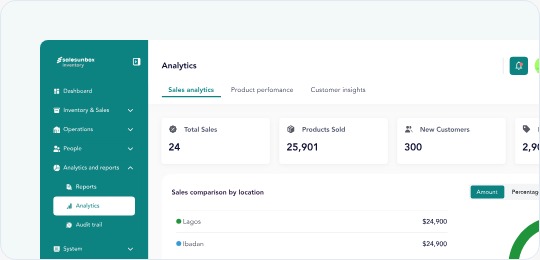
4. Analytics & Reports: Data-Driven Decisions
Data is only valuable if it translates into actionable strategy. The reporting suite turns your daily numbers into clear growth plans:
- Sales Reports: Filter total revenue by employee, date range, product category, or physical branch. Export files directly to Excel for clean accounting and tax reconciliation.
- Product Performance: View exactly which items generate the highest profit margins, which move fastest by volume, and which have stagnated on shelves for over 60 days. This shifts your purchasing from blind instinct to clear metrics.
- Customer Insights: Track new versus returning buyer cohorts over time. These advanced metrics, usually restricted to large corporations with data science teams, are built natively into our small business tools.
- Order Reports: Maintain total visibility over fulfillment rates, open web orders, and logistics delivery timelines.
Built for Scale: Advanced Functionalities
- API Access: Connect your inventory data directly to third-party accounting applications, enterprise resource systems, or custom internal business tools.
- Subscription & Local Settings: Manage localized tax rules, default receipt configurations, email triggers, and system upgrades from a single settings dashboard.
Is Unbox Inventory Right for Your Business?
This platform is specifically engineered for growing businesses that manage complex stock requirements, coordinate multiple team members, operate across several branches, and want to scale using a robust retail management software platform.
Whether you run a fast-paced pharmacy, a busy supermarket, an FMCG distribution network, or a growing wholesale warehouse, this tool helps you outgrow messy spreadsheets and disorganized chat apps.
Modernize Your Retail Business Growth
Successful retail execution requires clear, real-time visibility into your inventory, sales, customers, and personnel. SalesUnbox unifies these critical operations into a single, intuitive platform that is built to scale alongside your brand.
Join over 5,000 forward-thinking businesses that have modernized their workflows. Explore the core platform and find your specialized ecommerce tools by visiting SalesUnbox.
Unbox Inventory Frequently Asked Questions (FAQs)
Does Unbox Inventory work only for pharmacies, supermarkets, mini markets, FMCG distributors, and multi-location storefronts?
No. While the system is engineered to handle the high volume of pharmacies, supermarkets, mini markets, FMCG distributors, and multi-location storefronts, it is perfect for any retail or wholesale business that wants to grow. Whether you run a single clothing boutique, an electronics shop, or a solo online brand, these tools help you eliminate messy spreadsheets and automate your daily routines.
Can I manage multiple store locations with one SalesUnbox account?
Yes. Unbox Inventory features native multi-location oversight. You can monitor stock counts, view live sales data, track team members, and transfer inventory across multiple shops or warehouses from a single dashboard without paying for separate accounts.
What happens if a customer wants a refund or a sale needs to be changed?
The system handles returns cleanly by automatically recalculating stock levels back into your active inventory. Furthermore, the platform records every single action with an automated timestamp. If a worker changes a sale or issues a refund, you will see exactly who did it and when even if you are not physically at the shop.
Do I have to upload all my retail products manually one by one?
No. While you can add items manually, the platform includes a bulk import tool. You simply download our Excel spreadsheet template, fill in your product details (including costs, prices, barcodes, and expiry dates), and upload it to import your entire catalog in seconds.
How does the role-based access system protect my retail business?
The platform uses strict permission settings to keep your data secure. You assign specific roles to your team members based on their daily tasks. For example, a checkout operator can only see the POS sales screen and cannot view your financial reports, alter inventory data, or change system settings.
Can SalesUnbox handle transactions in multiple currencies?
Yes, the software is multi-currency ready by default. You can configure your primary operating currencies within the central settings menu. Once set up, the system automatically processes transactions, generates digital invoices, and calculates sales reports across your preferred currencies.
How do the automated low stock alerts work?
You can set custom low stock thresholds for every individual item in your storefront. When a fast-moving item drops below your chosen minimum quantity, the system flags it instantly on your dashboard. This gives you an early warning to reorder before facing a total stockout.
Leave a Reply